Building ETL Pipelines for a World Bank Education Programme
This is a process that took a couple of months to perfect, over 3 States in Nigeria, and numerous data collection exercises. I never meant to be a Data Engineer, but here i am, this is what my current work flow looks like!
Step 1: Extract – Designing the KoboToolbox Forms
Field officers visit schools at the beginning of the School Year to enrol students. They use mobile forms built in KoboToolbox, an open-source data collection platform designed for humanitarian and development work.
Designing a good form matters more than it sounds. A badly structured form produces data that’s nearly impossible to clean later (been there, the first form collected was really a nightmare i had to learn from). Good forms are built with constraints and validation baked in, required fields, numeric-only inputs for account numbers, and cascading dropdowns that prevent officers from selecting an invalid school/LGA combination. I have found Claude to be extremely competent at making forms. Forms that would take me 4 hours to build now just take a few minutes. Interesting time to be alive!
The forms are deployed to field officers’ phones and sync automatically when they have connectivity. A single week’s collection can produce thousands of rows.
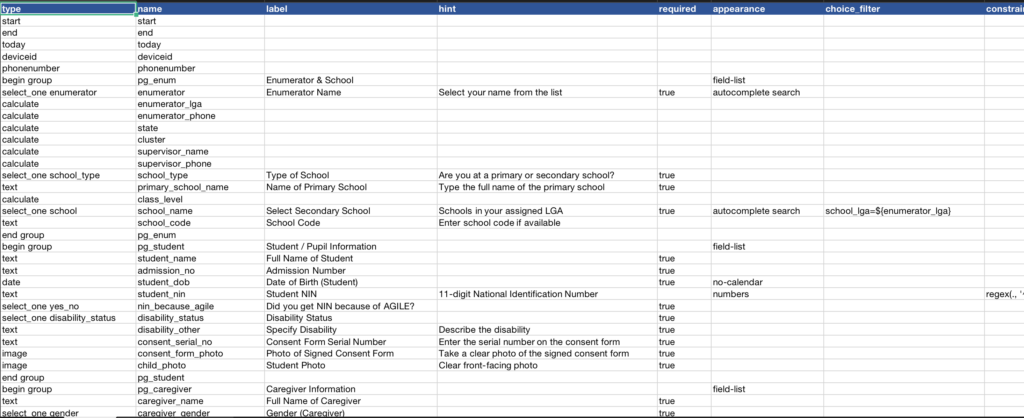
Sample Kobotoolbox Form
Step 2: Transform – Cleaning and Validation
Raw field data is messy. Names are misspelled. Bank account numbers have extra spaces. The same student appears under two slightly different names. This is where most of the work lives.
I export the raw data from KoboToolbox and run it through a Python/pandas pipeline, but first i do the manual bits of data cleaning in excel. (my preference is actually WPS Office, its much more lightweight and a lot faster on a Mac).
The first thing i do is delete any numeric fields that do not match the minimum number if any. (this has been fixed in later forms with a strict number length). then on to Duplication. Duplication can mostly be identified through duplicates in the numeric fields (NIN, BVN, Phone Numbers, Account Numbers) i go ahead and delete fields that have the same fields across all other columns.
Sometimes we collect bank account numbers, but the bank names are not standardised. So i got Chat GPT to make a json file that maps the actual bank names to the casually typed bank names, heres a small sample of the file.
{
  "polaris bank": "Polaris Bank",
  "first bank": "First Bank",
  "eco bank": "Ecobank",
  "access bank": "Access Bank",
  "keystone bank": "Keystone Bank",
  "barnabas mary frank": "",
  "zenith bank": "Zenith Bank",
  "gtbank": "GTBank",
  "polarisbank": "Polaris Bank",
  "gt bank": "GTBank",
  "union bank": "Union Bank",
  "uba bank": "United Bank for Africa",
  "unity bank": "Unity Bank",
}
the file contained all possible values entered as bank name, (the keys) which i would simply get the value by querying the key.
import json

banksjson = '/Training /clean_new_Cohort/bank_mapping.json'
bank_mapping = {}
with open(banksjson, 'r', encoding='utf-8') as f:
    bank_mapping = json.load(f)

print("AI Generated Mapping:")
print(json.dumps(bank_mapping, indent=2))

# Apply the mapping
df_students['Caregiver Bank Name2'] = df_students['Caregiver Bank Name'].astype(str).str.strip().str.lower()
df_students['Caregiver Bank Name2'] = df_students['Caregiver Bank Name'].astype(str).replace(bank_mapping)

# Check results
print("\nCleaned bank names:")
print(df_students['Caregiver Bank Name'].value_counts())

df_students.to_excel("/Training /clean_new_Cohort/FILES/2ndCohort_enrollment_nodupes_bvn_actno_banks.xlsx", index=False)
theres alot that goes on in this stage depending on the data i have. but the more robust the form i built in Step 1, the less cleaning there is to be done.
Step 3: Analysis – Data Collection Metrics
Before uploading, I generate per-school, per-lga summaries. These feed into the disbursement logic later down the line when its time for student verification. This i mostly use Tableu. But if the data isn’t so varied, excel graphs work just fine for an overview of what was collected. i tried metabase, but i found Tableu to be better, but i wanted metabase to be come my new go to. I don’t really plan on becoming a data engineer or analyst, but if i did i would probably explore scikit.
Step 4: Load – Uploading to MySQL
Once the data is approved, it goes into the production MySQL database that powers the programme’s PHP dashboard. This can be a python script, or just a CSV upload on to the database itself. I found this method problematic because of the number of rows i have, so the script is mostly the way.
Reflections
To be honest when i first read about ETL Pipelines, i thought everything was automated and i was doing something wrong, afterall, i am a software engineer that found herself doing data engineering. But turn out what i have is still considered ETL, just not the most advanced using a Spark cluster or Airflow DAG. I’ll be looking into how else i can make it more robust and automated. but the key i have realised is:
- collect data that is as clean as possible
- minimise manual data entry, use drop-downs and selects where possible
- enumerators type anything in as a last resort
Working at this intersection of technology and development taught me something that purely commercial projects don’t always surface: data quality is a human problem before it’s a technical one. The validation logic exists because a missing digit in a bank account number means a mother doesn’t receive money for her daughter’s education that term.